Decompiling is very useful for understanding srtipped binaries, most dissasemblers like IDA or Hopper have a plugin for decompiling binaries, generating a c like pseudocode.
Static analysis, is very useful in most of cases, specially when the binary is not so big, or when you just have an address where to start to analyze. But some algorithms will be learned in less time by dynamic analysis like tracing or debugging.
In cookiemonsters team, we are working on several tracers with different focus, but all of them mix the concept of tracing and decompiling to generate human-readable traces.
S2 is my tracer & decompiler plugin for gdb, very useful for ctfs.
Some of the features are:
- signed/unsigned detecion - conditional pseudocode (if) - syscall resolution - unroll bucles - used registers values - mem states - strings - logging
Inspired by James Kettle's great OWASP AppSec Europe talk on CORS misconfigurations, we decided to fiddle around with CORS security issues a bit. We were curious how many websites out there are actually vulnerable because of dynamically generated or misconfigured CORS headers.
The issue: CORS misconfiguration
Cross-Origin Resource Sharing (CORS) is a technique to punch holes into the Same-Origin Policy (SOP) – on purpose. It enables web servers to explicitly allow cross-site access to a certain resource by returning an Access-Control-Allow-Origin (ACAO) header. Sometimes, the value is even dynamically generated based on user-input such as the Origin header send by the browser. If misconfigured, an unintended website can access the resource. Furthermore, if the Access-Control-Allow-Credentials (ACAC) server header is set, an attacker can potentially leak sensitive information from a logged in user – which is almost as bad as XSS on the actual website. Below is a list of CORS misconfigurations which can potentially be exploited. For more technical details on the issues read the this fine blogpost.
Misconfiguation
Description
Developer backdoor
Insecure developer/debug origins like JSFiddler CodePen are allowed to access the resource
Origin reflection
The origin is simply echoed in ACAO header, any site is allowed to access the resource
Null misconfiguration
Any site is allowed access by forcing the null origin via a sandboxed iframe
Pre-domain wildcard
notdomain.com is allowed access, which can simply be registered by the attacker
Post-domain wildcard
domain.com.evil.com is allowed access, can be simply be set up by the attacker
Subdomains allowed
sub.domain.com allowed access, exploitable if the attacker finds XSS in any subdomain
Non-SSL sites allowed
An HTTP origin is allowed access to a HTTPS resource, allows MitM to break encryption
Invalid CORS header
Wrong use of wildcard or multiple origins,not a security problem but should be fixed
The tool: CORStest
Testing for such vulnerabilities can easily be done with curl(1). To support some more options like, for example, parallelization we wrote CORStest, a simple Python based CORS misconfiguration checker. It takes a text file containing a list of domain names or URLs to check for misconfigurations as input and supports some further options: CORStest can detect potential vulnerabilities by sending various Origin request headers and checking for the Access-Control-Allow-Origin response. An example for those of the Alexa top 750 websites which allow credentials for CORS requests is given below.
Evaluation with Alexa top 1 Million websites
To evaluate – on a larger scale – how many sites actually have wide-open CORS configurations we did run CORStest on the Alexa top 1 million sites: This test took about 14 hours on a decent connection and revealed the following results: Only 29,514 websites (about 3%) actually supported CORS on their main page (aka. responded with Access-Control-Allow-Origin). Of course, many sites such as Google do only enable CORS headers for certain resources, not directly on their landing page. We could have crawled all websites (including subdomains) and fed the input to CORStest. However, this would have taken a long time and for statistics, our quick & dirty approach should still be fine. Furthermore it must be noted that the test was only performed with GET requests (without any CORS preflight) to the http:// version of websites (with redirects followed). Note that just because a website, for example, reflects the origin header it is not necessarily vulnerable. The context matters; such a configuration can be totally fine for a public sites or API endpoints intended to be accessible by everyone. It can be disastrous for payment sites or social media platforms. Furthermore, to be actually exploitable the Access-Control-Allow-Credentials: true (ACAC) header must be set. Therefore we repeated the test, this time limited to sites that return this header (see CORStest -q flag): This revealed even worse results - almost half of the websites supporting ACAO and ACAC headers contained a CORS misconfigurations that could be exploited directly by a web attacker (developer backdoor, origin reflection, null misconfig, pre-/post-domain wildcard):
The Impact: SOP/SSL bypass on payment and taxpayer sites
Note that not all tested websites actually were exploitable. Some contained only public data and some others - such as Bitbucket - had CORS enabled for their main page but not for subpages containing user data. Manually testing the sites, we found to be vulnerable:
A dozen of online banking, bitcoin and other payment sites; one of them allowed us to create a test account so we were able to write proof-of-concept code which could actually have been used to steal money
Hundred of online shops/e-commerce sites and a bunch of hotel/flight booking sites
Various social networks and misc sites which allow users to log in and communicate
One US state's tax filing website (however, this one was exploitable by a MitM only)
We informed all sites we manually tested and found to be vulnerable. A simple exploit code example when logged into a website with CORS origin reflection is given below.
The Reason: Copy & Paste and broken frameworks
We were further interested in reasons for CORS misconfigurations. Particularly we wanted to learn if there is a correlation between applied technology and misconfiguration. Therefore we used WhatWeb to fingerprint the web technologies for all vulnerable sites. CORS is usually enabled either directly in the HTTP server configuration or by the web application/framework. While we could not identify a single major cause for CORS misconfigurations, we found various potential reasons. A majority of dangerous Access-Control-* headers had probably been introduced by developers, others however are based on bugs and bad practices in some products. Insights follow:
Various websites return invalid CORS headers; besides wrong use of wildcards such as *.domain.com, ACAO headers which contain multiple origins can often be found; Other examples of invalid - but quite creative - ACAO values we observed are: self, true, false, undefined, None, 0, (null), domain, origin, SAMEORIGIN
Rack::Cors, the de facto standard library to enable CORS for Ruby on Rails maps origins '' or origins '*' into reflecting arbitrary origins; this is dangerous, because developers would think that '' allows nothing and '*' behaves according to the spec: mostly harmless because it cannot be used to make to make 'credentialed' requests; this config error leads to origin reflection with ACAC headers on about a hundred of the tested and vulnerable websites
A majority of websites which allow a http origin to CORS access a https resource are run on IIS; this seems to be no bug in IIS itself but rather caused by bad advises found on the Internet
nginx is the winner when it comes serving websites with origin reflections; again, this is not an issue of nginx but of dangerous configs copied from "Stackoverflow; same problem for Phusion Passenger
The null ACAO value may be based on programming languages that simply return null if no value is given (we haven't found any specific framework though); another explanation is that 'CORS in Action', a popular book on CORS, contains various examples with code such as var originWhitelist = ['null', ...], which could be misinterpreted by developers as safe
If CORS is enabled in the crVCL PHP Framework, it adds ACAC and ACAO headers for a configured domain. Unfortunatelly, it also introduces a post-domain and pre-subdomain wildcard vulnerability: sub.domain.com.evil.com
All sites that are based on "Solo Build It!" (scam?) respond with: Access-Control-Allow-Origin: http://sbiapps.sitesell.com
Some sites have :// or // as fixed ACAO values. How should browsers deal with this? Inconsistent at least! Firefox, Chrome, Safari and Opera allow arbitrary origins while IE and Edge deny all origins.
How To Change Facebook's Default Theme To Any Color You Want
We are going to share an interesting trick on changing your Facebook default theme. You just need a Google Chrome extension to perform this trick. If you are among me who feels very fatigued with the look of Facebook's by default theme then this is a must-see post because you will find out the easiest trick to make your facebook more attractive than before.
Facebook is a social networking site which empowers people to connect with friends and people around. That's how Facebook is habitually introduced. However, Facebook is beyond the need of being introduced as almost everyone is on it.
A couple of Days ago I was simply Surfing Google Chrome website and I somehow stumbled upon a Chrome Extension. Yes, a Chrome extension that will give your Facebook a Whole new look. I was apprehensive to try it, So I just installed it and checked my facebook. I was astonished to see my facebook homepage have all new look. I found it refreshing and decided to write steps on How to Change Facebook Themes using Chrome Extension.
How To Change Facebook's Default Theme To Any Color You Want
If You are among me who feels very fatigued with the look of Facebook's by default theme then this is a must-see post, Because you will find out the easiest trick to make your facebook more attractive than before. Simply follow the steps to know about it.
How to Change Facebook Theme Using Chrome Extension
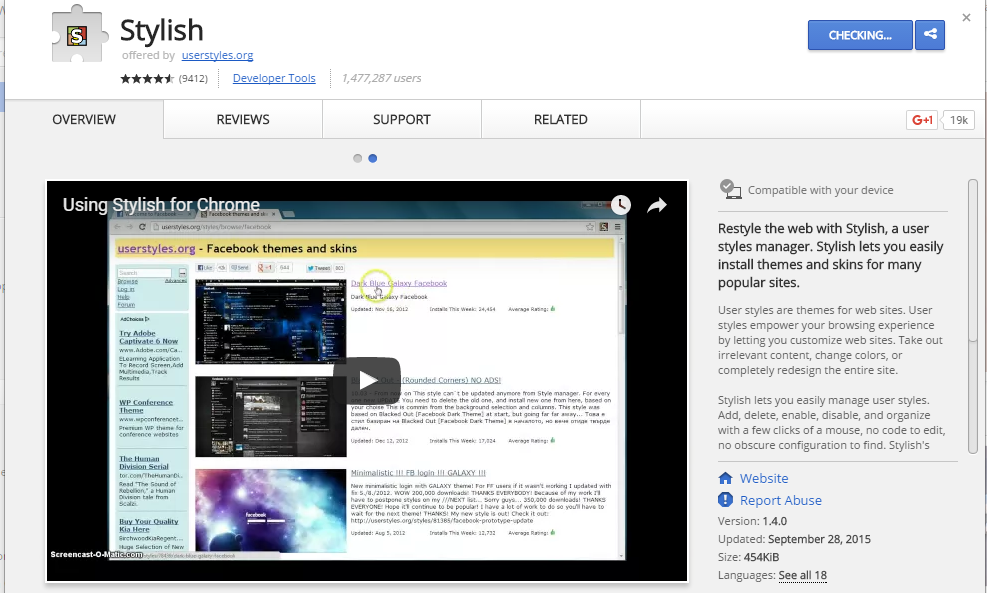
Step 1. Install Stylish for Chrome from the Chrome Web Store. It will take hardly a minute to get installed in your Chrome browser.
Change Facebook Theme Using Chrome Extension
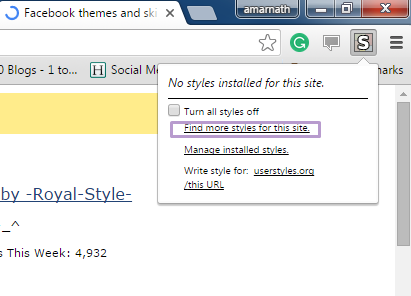
Step 2. Navigate to Facebook.com and click on the S button. Click on Find Styles for this Site to open a new tab with free themes to use for Facebook. Most of the themes are free and attractive too you can easily browse over the full website to discover your favorite theme.
Change Facebook Theme Using Chrome Extension
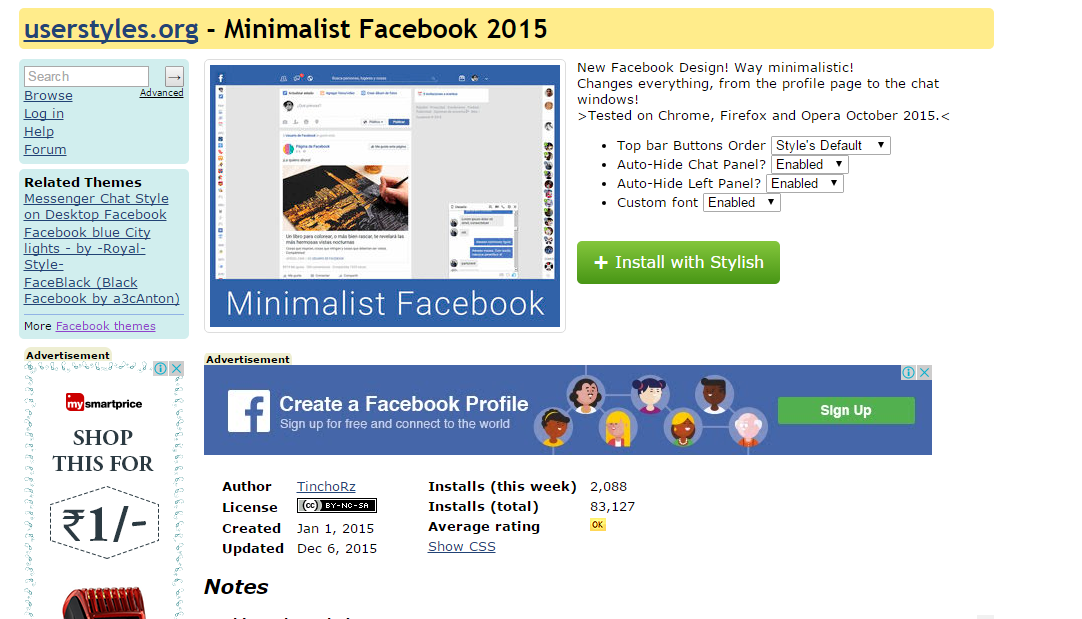
Step 3. Now You will be redirected towards https://userstyles.orgGuess what! This site contains huge numbers of Facebook themes, One thing is for sure that you will be confused in-between what to select and which one to skip. Select any them and click on it. Now you will be given a full preview of your selected theme.
Change Facebook Theme Using Chrome Extension
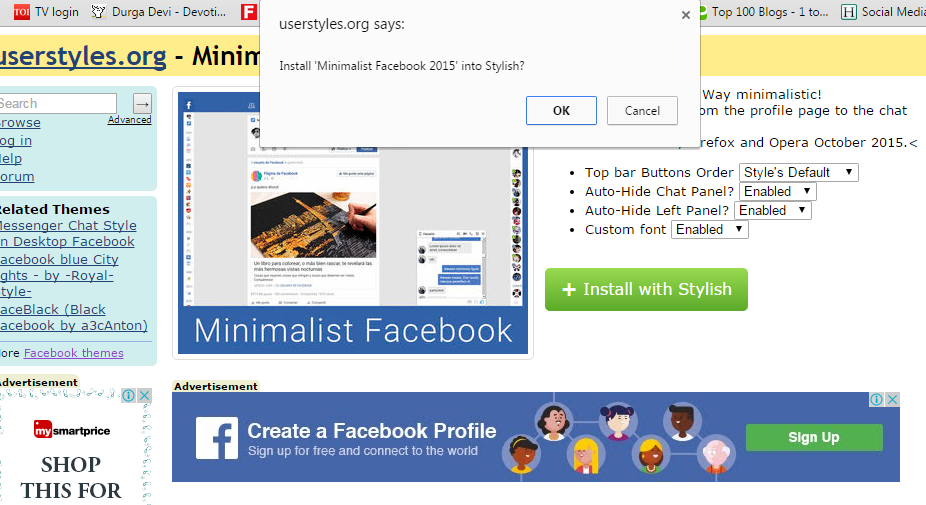
Step 4. If everything is fine in the previewed theme, click on Install with Stylish button at the top right corner of the page. It will take few seconds or minutes depends on your theme size to be installed in Stylish Extension, once installed you will be notified with a success message.
Change Facebook Theme Using Chrome Extension
Step 5. Now whenever you open Facebook, it will show the theme that you have installed with Stylish instead of the boring old blue theme.